|
|

The facility to build modular, reusable components is an important feature of any programming language, and for the Windows Developer, the Dynamic Link Library (DLL) has been the primary mechanism for this. This beginner-level tutorial and the sample code that complements it assume that you have some understanding of .NET and C# and that you are interested in packaging some reusable classes to support later applications. 1. For simplicity, our DLL will contain one very basic function, so we'll get right to it. We write our DLL as follows. 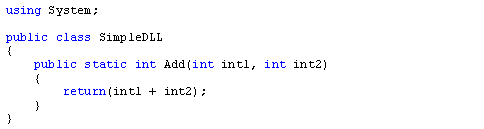
Let's take a quick look at what we just did. We referenced the System namespace with the using directive to provide all of the basic .NET context, including such things as data type definitions. We named our class, SimpleDLL, and defined its attributes and methods, in this case the single method Add. We defined Add as taking two integers as parameters and as having an integer returned. 2. Save our DLL as SimpleDLL.cs. Now we are ready to package our DLL for consumption by other programs. 3. Generating our DLL is just a matter of understanding our compile options. Using the C# compiler, csc.exe, we tell the compiler that this will be a library by adding the /target option (N.B. the default location of the compiler will be C: \ WINDOWS \ Microsoft.NET \ Framework \ <version>). 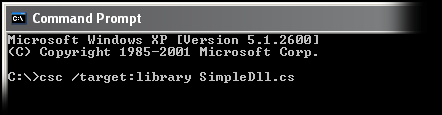
This will generate SimpleDLL.dll by default. To specify an alternate name, use the /out option. 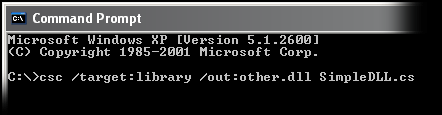
Congratulations, you have just created a .NET DLL! But we still have some due diligence. 4. To make sure our DLL will run as expected, we will create a test harness console application as follows. 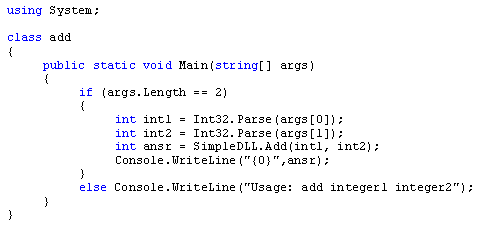
Let's take a quick look at what we just did. As before, we referenced the System namespace, named our class, and defined its attributes and methods, in this case the console procedure Main. We check that the number of arguments passed to Main is two. If it is not, we display a usage message. Otherwise, we pass our arguments to our DLL Add method and display the returned value. 5. Save our console application as add.cs. 6. We compile our test harness console application, referencing our DLL. 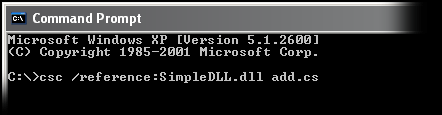
This will generate add.exe. Now, we run our test.... 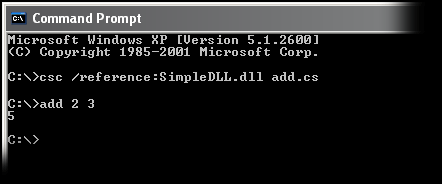
|
 |
| Copyright © 2001-2005 sebastianfernandes.com | Terms of Use |
|
|