|
|

Microsoft® Agent technology provides an easy means to script rich, interactive animated characters into web pages, programs, or documents. This beginner-level tutorial and the sample code that complements it take you through the basic steps in setting up an agent and having it say "Hello World!" (what else) in a web page using VBScript. 1. We include the agent control on our web page by adding the control's object tag and assigning it an ID. We will use this ID to reference this control from our VBScript later on. 
2. For the agent to be able to speak, we need to include the text-to-speech control, similarly. 
We will not be referencing the text-to-speech engine explicitly, but note that including these tags will result in these controls being downloaded and installed if they are not already available on the client machine. 3. Now, on to our VBScript. We begin, of course, with our opening tag. 
4. We declare a variable which we will use to reference our agent control. It is not critical that we do this, but it will save us having to use the full ID of the control and name of the loaded character later on. In short, it will save us some typing and will ultimately make the script more readable. 
5. We will use the page's OnLoad procedure to initialize our agent control as follows. 
Let's take a quick look at what we just did. We loaded the Microsoft® Merlin character to our agent control and assigned our Merlin variable so that we could more easily reference the loaded agent. To animate our character, we will first have to get the animation and state sequences before we can play them. We do this as part of the initialization so that everything will be ready to go when we want to finally display our agent character. 6. Next, we add a function to manage the animation sequence itself, called SayHelloWorld as follows. 
The animation sequence displays the loaded character, plays the greeting animation, has the character speak "Hello World" (as promised), and re-hides the character. 7. That's all there is to it! This function can now be called for any event - a button click, a mouseover, or simply added to our OnLoad procedure. 8. The completed web page is as follows. 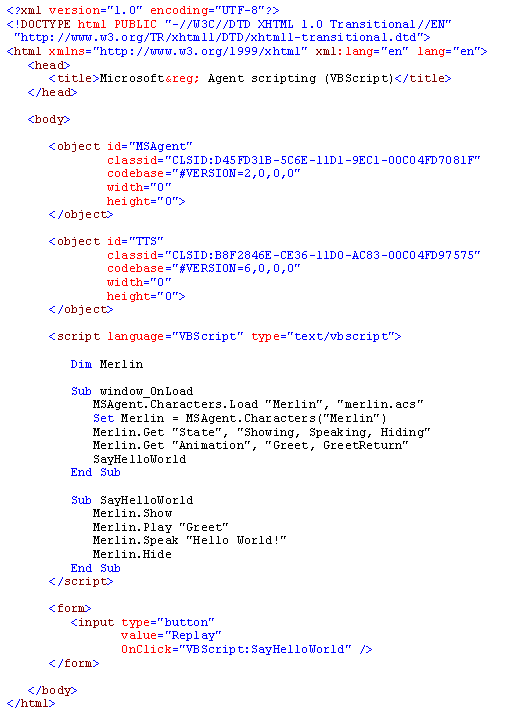
As you would expect, this beginner-level tutorial is just the tip of the iceberg. There are many available states and animation sequences, various agent events that can be scripted (e.g. dragging or clicking the agent character), error handling that should be considered, countless ways to manipulate the character's speech itself, other Microsoft® and third party characters, etc., but hopefully, this tutorial has been a good introduction to the simple but rich interactions that can be scripted using this awesome Microsoft® technology. |
 |
| Copyright © 2001-2005 sebastianfernandes.com | Terms of Use |
|
|